Video Downloader — Save Instagram Videos Free

The easiest way to keep a personal offline copy of your Instagram videos — no app, no login. Paste a link, get your file in seconds.

Your video is ready — choose quality:

Thumbnail preview of the Instagram video
Preview thumbnail of the Instagram video post
  • Original Quality
  • HD MP4
  • No Login Required
  • 100% Free

Key features

  • No app — works in any browser
  • Original quality kept
  • All video lengths supported

Save Instagram Videos Online Free

DownReels lets you keep a personal offline copy of public Instagram videos — working as a dedicated Instagram video saver for PC, Mac, iPhone and Android without any app or software. Built specifically for standard Instagram video posts, it gives a faster, cleaner experience for the content type you actually need.

An Instagram video downloader is a browser-based tool that lets you save public Instagram videos to your device for offline viewing — no account or app installation required.

  • Content creators saving inspiration from public accounts for personal offline reference
  • Anyone who wants to watch public Instagram videos offline without an internet connection
  • Users on slow or limited data connections who need a file saved locally
  • Anyone saving public videos for personal offline viewing on their own device
  • Anyone who wishes Instagram offered a simple save-to-device option
How to Save an Instagram Video

Three steps is all it takes. No account needed, no app to install — just a link and a click.

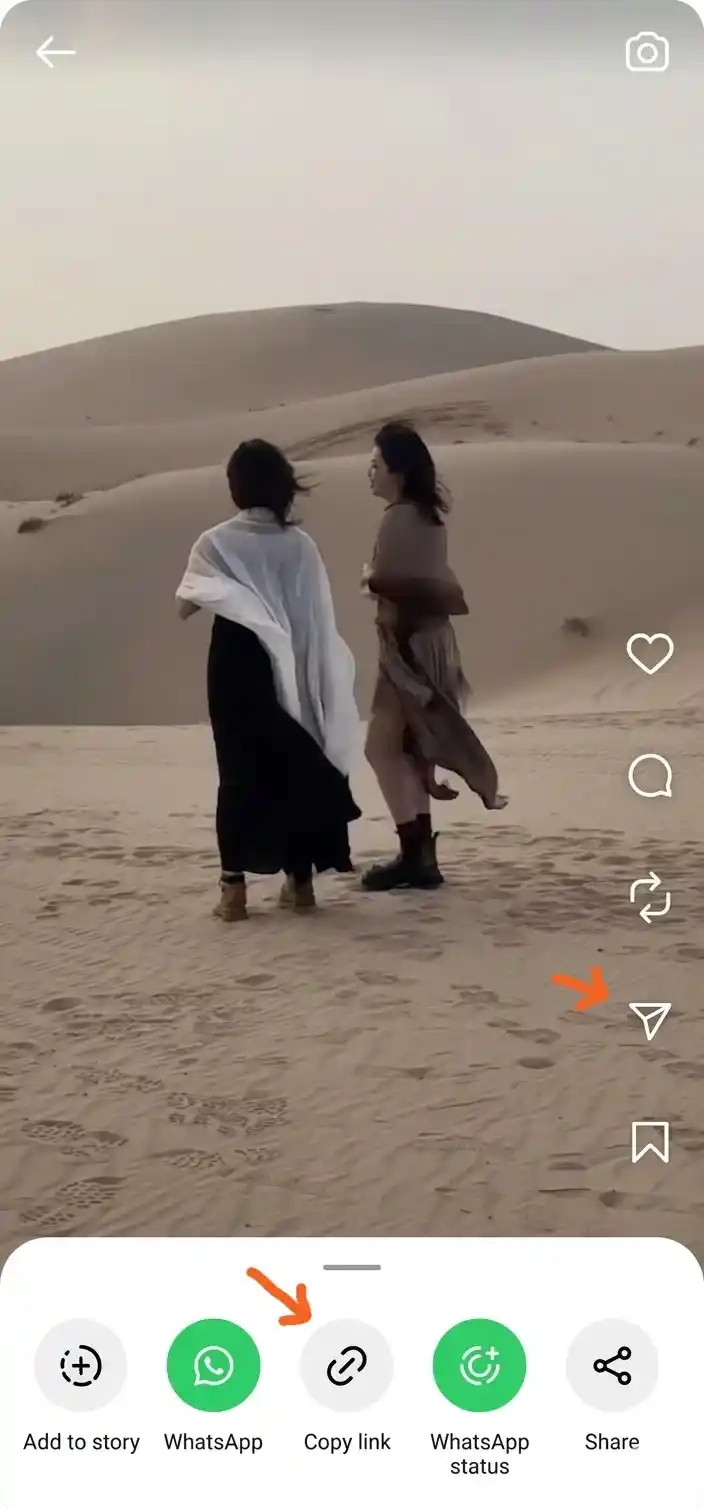
  1. Step 1 — Copy the Video Link

    • Open Instagram and find the video post you want to save
    • Tap the three-dot menu at the top right of the post
    • Select “Copy Link” — the URL is now on your clipboard
    Step 1 — showing Instagram video post three-dot menu with Copy Link option
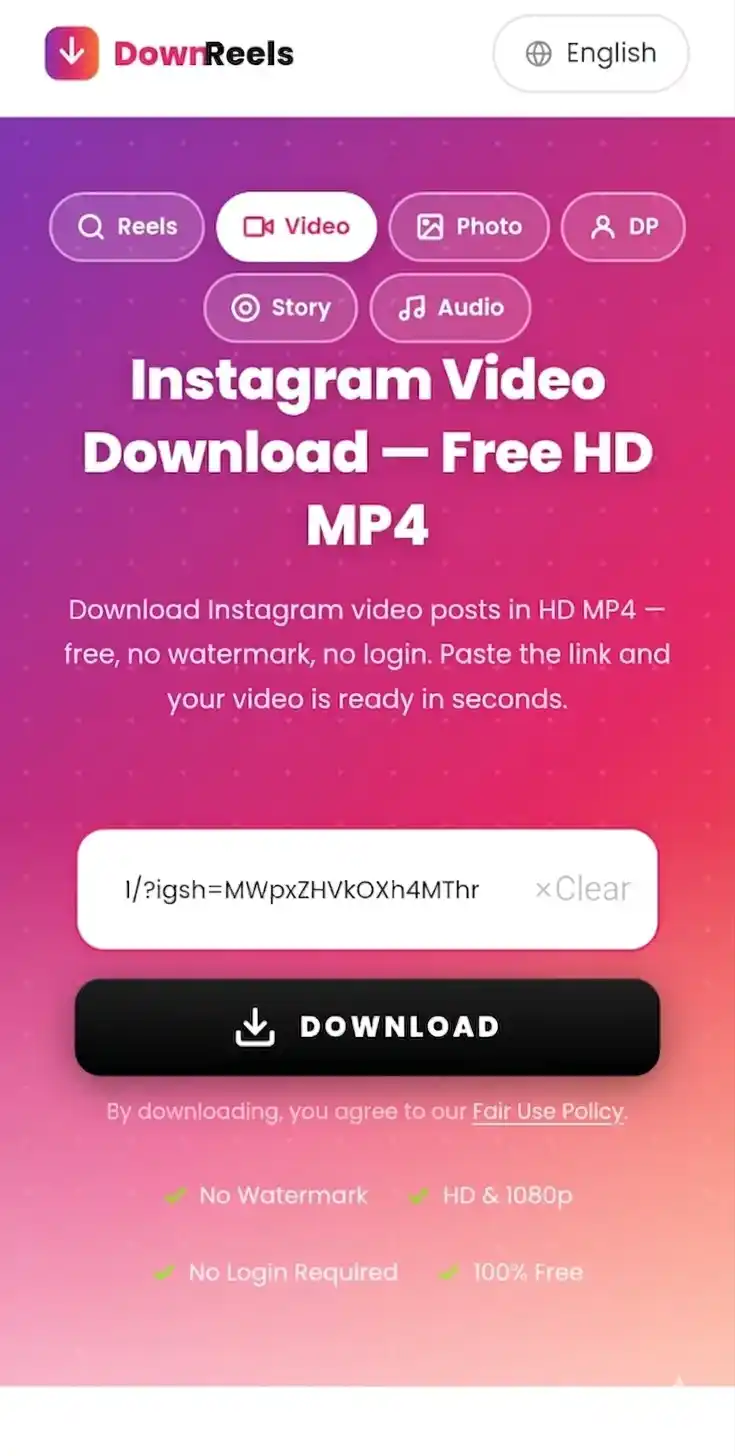
  2. Step 2 — Paste the Link

    • Come back to DownReels
    • Tap the input box and paste your link using the Paste button or Ctrl+V
    • Make sure the full Instagram video URL is in the field
    Step 2 — Phone screen showing Instagram video link pasted into DownReels input box
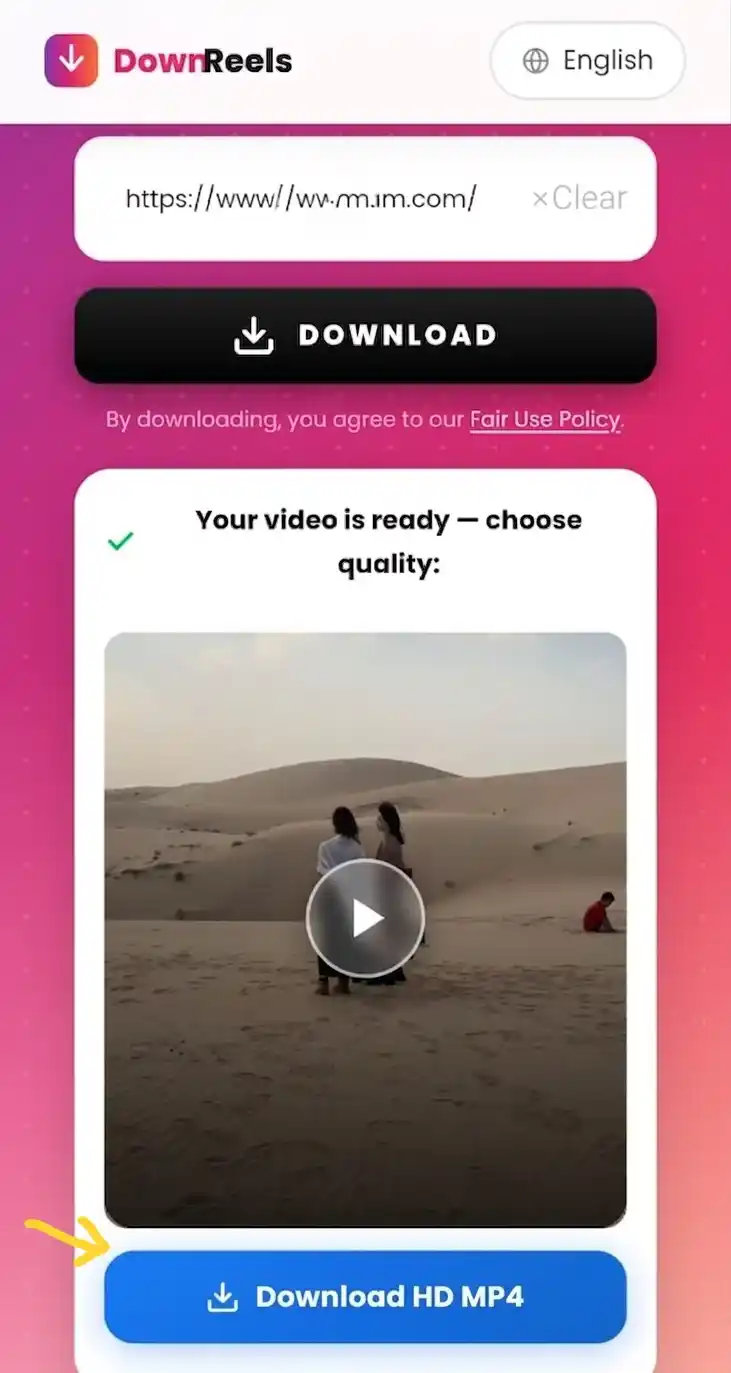
  3. Step 3 — Save the Video

    • Click the DOWNLOAD button and wait just a moment
    • A thumbnail preview appears with quality options below it
    • Choose Download HD and the MP4 saves to your device
    • Find it in your Downloads folder — ready to watch offline
    Step 3 — Mobile screen showing Download HD MP4 button to save Instagram video

How to Save Instagram Videos on iPhone (to Camera Roll)

Save your Instagram videos directly to your iPhone camera roll — in seconds, with no app needed.

iPhone Steps — Safari Browser

Open Safari on your iPhone and go to DownReels. Open Instagram, find the video, tap the three-dot menu and tap Copy Link. Return to DownReels, paste the link and tap Download. The video saves to your Files app. To move it to your camera roll, open Files, press and hold the video file, then tap Save Video — it appears in Photos under Recents instantly. See full device save locations in our FAQ.

Using Chrome on iPhone

Chrome on iPhone works identically — open DownReels, paste your Instagram video link, tap Download. The file saves to your Files app Downloads folder. From there, press and hold the file and tap Save Video to add it to your iPhone camera roll.

How to Save Instagram Videos on Android (to Gallery)

Save public Instagram videos straight to your Android gallery — no app install, no account needed.

Android Steps — Chrome Browser

Open Chrome on your Android phone and visit DownReels. Copy the Instagram video link from the three-dot menu and paste it into the tool. Tap Download and the MP4 file saves to your Downloads folder. It appears automatically in your Gallery app under Downloads — no extra steps needed.

On Android, saved Instagram videos appear in two places: your Downloads folder (open Files app → Downloads) and your Gallery app (look for the Downloads album). You can move the video to any other album from Gallery by pressing and holding the file and tapping Move. See full device save locations in our FAQ.

Key Features of the Instagram Video Saver

Built for one job — saving public Instagram videos in HD, clean and fast — and doing it better than tools that try to do everything at once.

  • Quality

    HD Video Quality

    Instagram video posts are stored at the resolution the creator chose when uploading — square, portrait, or widescreen, up to Full HD where the original supports it. What you save through DownReels keeps that same quality level Instagram holds for public viewing, with no extra processing step on our end.

  • Clean

    Original Quality, Unchanged

    The file you save keeps the original quality of the public post — the same resolution and format shown on Instagram. Just a clean MP4 file ready for offline viewing.

  • Speed

    Fast & Easy

    Paste a link, click download — your video is ready in seconds. There are no redirect pages, no countdown timers, no captcha loops and no sign-up forms standing between you and your file. The result appears as a thumbnail preview with a single download button — nothing to figure out.

  • Privacy

    No Login Required

    You never need to sign into Instagram or share any personal details. DownReels works entirely without authentication — just the video link is enough. No username, no password, no permission needed from anyone.

  • Free

    Free to Use

    No sign-up and no account needed. The tool is free to use for keeping your own personal offline copies.

What This Instagram Video Saver Supports

This tool is optimised specifically for public Instagram video posts — a focused saver for the content type you actually need. That focus makes it faster and more reliable than all-in-one tools.

  • Instagram Video Posts Standard video posts from any public Instagram profile — the core focus of this tool
  • Carousel Videos Video slides within multi-post carousels — saved individually in full quality

✖ Not for Reels, Photos, Stories, or Profile Pictures

This page is dedicated to video posts only. For everything else, DownReels has a dedicated tool — each one built and optimised for its own content type.

Looking for Something Else? Use the Right Tool

Each DownReels tool is built for one content type — making every save faster and more reliable.

  • Instagram Reels Downloader

    Save any public Reel as HD MP4 — no login, in seconds.

    Save Reels
  • Instagram Photo Downloader

    Save single photos and carousel images in original quality — free, instant.

    Save Photos
  • Instagram Profile Downloader

    Save any public Instagram profile picture in full size — no cropping, full HD.

    Save DP
  • Instagram Audio Downloader

    Save the audio track from any public Instagram post as MP3.

    Save Audio
  • Instagram Story Downloader

    Save Stories from any public Instagram account — free, no login, no app needed.

    Save Stories

Instagram to MP4 — Save Your Videos

Every Instagram video saved through DownReels comes as MP4 — the most widely supported format on the planet. Saving Instagram to MP4 takes seconds: paste the link, click download, and the file lands on your device ready to play anywhere. The original resolution and audio are preserved — nothing compressed by DownReels. MP4 works natively on every iPhone, Android phone, Windows PC, Mac, smart TV, and media player without any conversion step required on your end.

The MP4 file you receive works straight away on any device — phone, tablet, laptop, or smart TV. You can keep it as a personal offline copy, or open it in any media player. No conversion step is needed because MP4 is the native format every modern device already understands.

Instagram video posts support resolutions up to 1080p Full HD with H.264 encoding and AAC audio. MP4 is natively supported on over 99% of devices, including every iPhone model since 2010, all Android phones, Windows, macOS, and all major smart TVs.

  • FormatMP4
  • Max QualitySource quality
  • ConversionNone needed
  • AudioIncluded

Safe & Private

DownReels works without ever touching your Instagram account. No login is requested at any point — the only thing you share with us is a public post link, and that is used solely to process your request.

  • No sign-up, no form, no email address — open the page and the tool is ready immediately
  • No personal data collected — we do not ask for your name, email, or any account details
  • No payment details ever — free means free, no card required at any step
  • Protected by HTTPS — the connection between your browser and this page is always encrypted

Why Use a Dedicated Instagram Video Saver?

Instagram has two separate video formats — standard video posts and Reels. They look similar in a feed but they have different URL structures and are processed differently by saving tools. A tool built for Reels will not always handle a standard video post correctly, and vice versa.

This page is built specifically for standard Instagram video posts — the kind published to a profile grid, including single videos and carousel posts that contain video slides. If the link you have is from a video post rather than a Reel, this is the right tool for it.

Instagram video posts can be anywhere from a few seconds to 60 minutes long. DownReels supports all publicly available video lengths — short clips and long-form videos both work through the same simple input box.

  • FocusedVideo only
  • SpeedUnder 10s
  • InterfaceClean
  • CostFree

Instagram Video Saver — Technical Details

  • Output format: MP4 — the standard format for Instagram video posts
  • Supported post types: single video posts and carousel posts containing video slides
  • Aspect ratio: square 1:1, portrait 4:5, and widescreen 16:9 all supported
  • Audio track: included in every saved file
  • Video length: a few seconds to 60 minutes — all publicly available lengths
  • What you need: one public Instagram video post link — nothing else
  • No app needed: works in your browser — Chrome, Safari, Firefox and Edge all supported
  • Saves to: Downloads folder on Android and PC — Files app on iPhone

Last updated: September 1, 2026  ·  Reviewed by the DownReels Team

Frequently Asked Questions

Quick answers to the most common questions about saving Instagram videos.

  • Open Instagram, find the video post, tap the three-dot menu and select Copy Link. Then return to DownReels and paste the link — it works in Chrome, Safari, Firefox and Edge on any device. The MP4 file saves to your device in seconds. On iPhone it saves to the Files app first; on Android and PC it goes straight to your Downloads folder.

  • Yes — Instagram has no native save-to-device button, so DownReels lets you keep a personal offline copy of any public Instagram video on your phone or computer in MP4 format. Only public accounts are supported — private profiles cannot be accessed.

  • Yes. The file you save through DownReels keeps the original quality of the public post — the same resolution and format shown on Instagram, with no extra re-encoding applied by DownReels.

  • Yes — every video saved through DownReels includes the original audio track. The MP4 file contains both video and audio exactly as the public post had them. If the original post had sound, your saved file will too.

  • Yes, completely free. No payment, no subscription, no account, and no credit card — ever. There are no daily limits or hidden caps of any kind.

  • It will not work. Private Instagram accounts are protected at the server level and cannot be accessed by any third-party tool. Only public posts are supported. If the account is private, ask the creator directly or use Instagram's in-app save feature.

  • Videos save to your device's default Downloads folder automatically. On Android and PC/Mac they go straight to Downloads. On iPhone they save to the Files app — from there you can move them to your Photos library or share them anywhere.

  • Yes. DownReels requires no login, stores no user data, and runs entirely over HTTPS. Only the public post URL is used — to process your request and nothing else. Full privacy details are covered in the Safe & Private section above.

  • The most common reason is a private account — DownReels can only access public Instagram videos. Other causes include a broken or incomplete link, a post that has been deleted, or a temporary Instagram server issue. Check that the account is public, copy the link again directly from Instagram, and try once more. If the problem continues, refreshing the page or switching browsers usually resolves it.

  • Saving public Instagram content for personal, offline use may be permitted depending on your local laws. Redistributing, republishing, or using someone else's content commercially without the creator's permission is not — copyright always stays with the original creator. DownReels is intended for personal use only.