Instagram Reels Downloader & Saver

Paste any Instagram Reels link and keep a personal copy on your device in seconds — no login, no app, nothing added to your file.

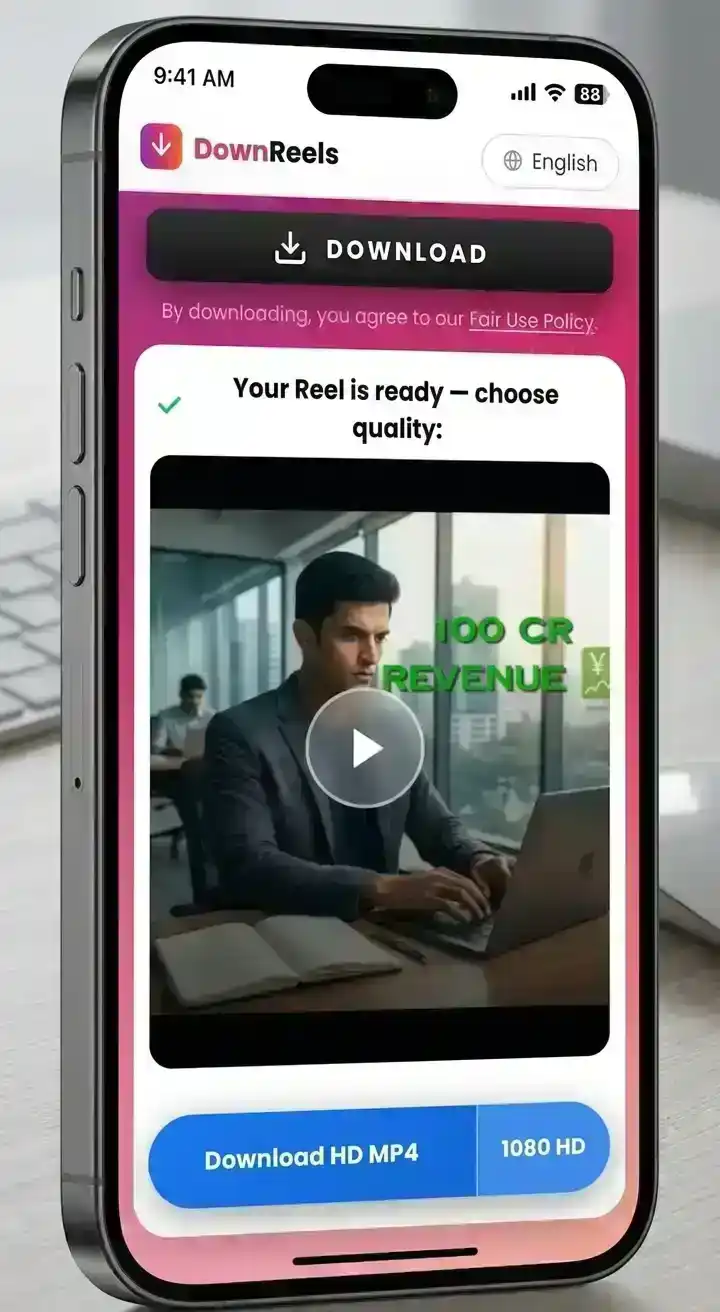
✓ Your Reel is ready — choose quality:

Reel thumbnail — Instagram video preview
Reel preview thumbnail
  • HD MP4
  • Original source quality
  • No Login Required
  • 100% Free

Key features

  • HD
    Original source quality
  • ©
    Nothing added to your files
  • Unlimited free downloads

How to Save Instagram Reels in 3 Easy Steps

Three simple steps to save any public Reel to your device as an MP4 file — no app, no account, no cost.

  1. Step 1 - Copy the URL

    • Open the Instagram app or visit the Instagram website on your browser
    • Find the specific Reels, post, video, carousel or IGTV content you want to download
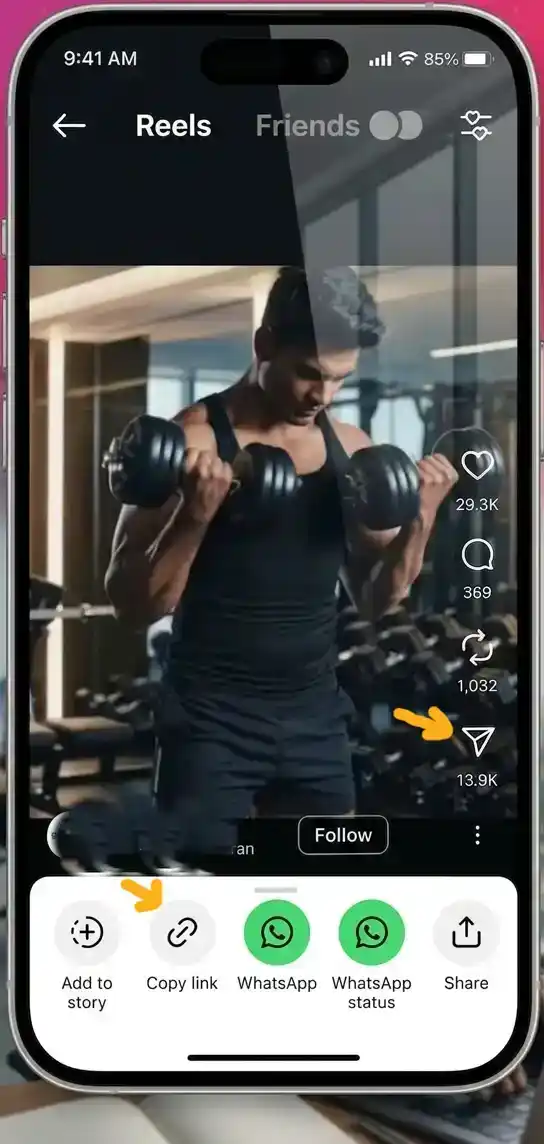
    • Copy the Instagram reel download link by tapping the share icon then “Copy Link”
    Step 1 — iPhone showing Instagram app with share menu open to copy Reel link
  2. Step 2 - Paste the Link

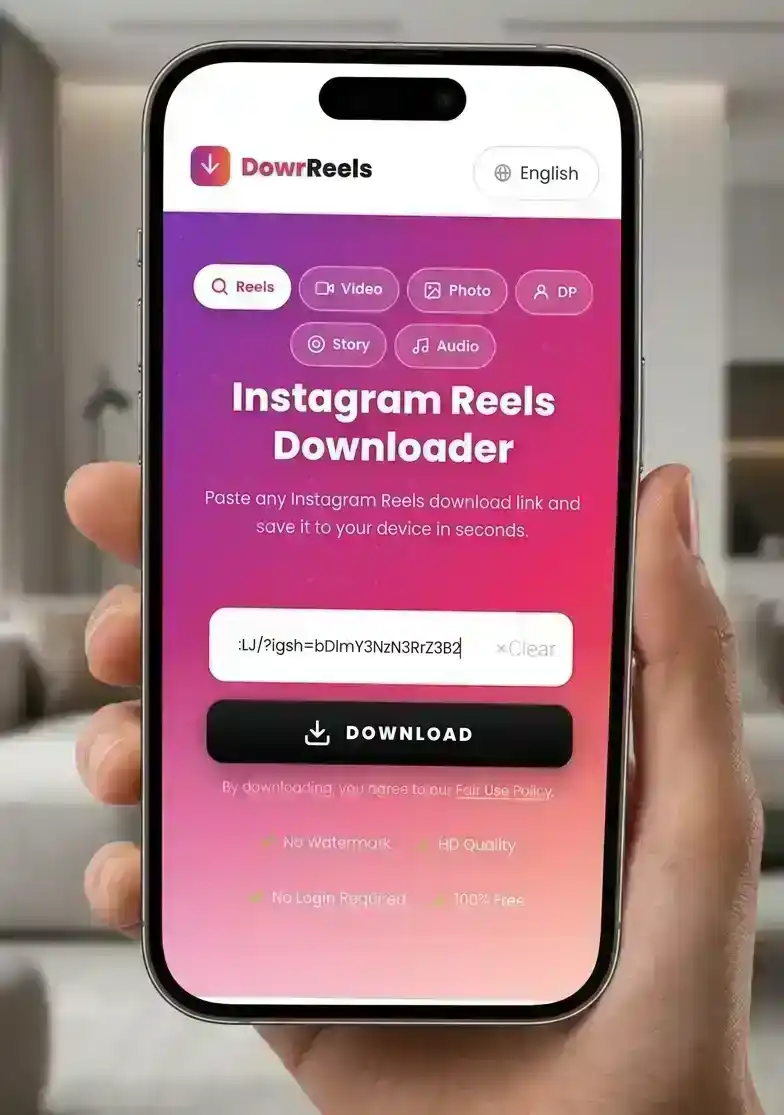
    • Return to DownReels.com and paste your Instagram Reels download link into the input box
    • Look for the URL input box — it is well positioned at the top of the page
    • Paste the URL that you copied using the Paste button or Ctrl+V
    • Verify the full Instagram link is correctly entered in the field
    Step 2 — Phone screen showing Instagram Reel URL pasted into DownReels downloader
  3. Step 3 - Download the Content

    • Click the green DOWNLOAD button and wait a few seconds
    • The thumbnail preview appears with the blue Download HD MP4 button
    • Tap Download HD MP4 to save the Reel to your device
    • The file saves directly to your Downloads folder or Gallery
    Step 3 — Mobile screen showing Download button to save Instagram Reel as HD MP4

Download Instagram Reels Free — Why Choose DownReels?

Four reasons DownReels stands apart as the fastest Instagram Reel saving tool online.

  • Speed

    Reel Ready in Under 3 Seconds

    From paste to file in seconds. DownReels skips the waiting screens, frozen progress bars, and timeout errors that plague other tools. The moment you click Download, the request goes out and the result comes back — no intermediate steps, no queue, no drama.

  • Privacy

    Zero Data Stored — Zero Tracking

    The URL you submit is used once to fetch your file and then discarded from our servers. We use Google Analytics to understand traffic — this collects anonymous usage data but is never linked to what you download. No account required, no download history stored.

  • Compatibility

    Every Device. Every Browser. No App.

    DownReels lives in your browser tab. There is nothing to install, nothing to update, and nothing stored on your device beyond the file you chose to save. It behaves identically whether you open it on a five-year-old Android or the latest MacBook — the interface adapts, the output does not change.

  • Reliability

    Consistent Results on Any Public Post

    DownReels handles standard Reel links, carousel posts, and IGTV content from any public profile. The link format does not matter — with or without tracking parameters, shortened or full URL, copied from the app or the browser. If the post is public, the result is a working file.

When to Use Instagram Reel Saver

Whether you create content, study trends, or just want to save clips you love — here are the moments when DownReels is most useful.

  • Watch Reels Without the Instagram App

    Prefer watching Reels outside the Instagram app? Keep a personal copy of a public Reel and play it in any media player on your phone, tablet, or computer — no feed, no distractions, no account needed. And when you want to show a Reel to friends or family, the simplest way is to share the original Instagram link, so the creator keeps the views and the credit.

    01
  • 02

    Save Trending Reels Offline

    Anyone saving Reels they enjoy — tutorials, recipes, workouts, or creative clips — benefits from having them available offline. When you spot content worth keeping, download it instantly for personal offline viewing. DownReels makes saving public Reels to your own device completely effortless and free.

  • Back Up Your Own Reels

    If you post Reels on Instagram, your uploads deserve a local backup. Original files get lost, phones get replaced, and app archives are easy to forget. Paste the link of your own Reel and keep a clean MP4 copy of everything you have published — a personal archive that lives on your device, not just in the app.

    03

Technical Specifications — IG Reels Downloader:

  • Output format: MP4 (H.264 / AAC audio)
  • Resolution: up to 1080p (source-dependent)
  • Supports: Reels, IGTV, carousel, standard posts
  • Processing time: 2–5 seconds per request
  • Requires: public Instagram account URL only
  • Server logs: none — requests are not retained
  • Browser support: Chrome, Safari, Firefox, Edge
  • OS support: iOS, Android, Windows, macOS, Linux

Best Online Instagram Reels Downloader 2026

Whether you need an Instagram reel downloader for a single clip or want to save dozens of Reels — most saving tools in 2026 have a hidden problem: they quietly re-encode your clip before delivering it, shaving resolution or adding artifacts you might not notice until you play it back on a large screen. DownReels skips that step entirely. DownReels delivers the video in its original publicly available quality — same resolution, same format the creator's audience sees.

The other difference users notice immediately is the absence of friction. No countdown timers, no captcha loops, no "please disable your ad blocker" messages. Whether you want to save Instagram Reels for offline viewing or simply keep content you love, DownReels makes it effortless — you submit a link, the file arrives, no installation required.

An Instagram Reels downloader — or IG reels downloader — is a browser-based tool that retrieves and saves public Instagram Reel videos directly to your device — no account, no app, and no Instagram login required.

Download Instagram Reels in Original Quality

The easiest way to download Instagram Reels online is to paste the link directly — no app, no account needed. Instagram stores Reels at the resolution they were uploaded — up to 1080p for creators who shoot in full HD. DownReels fetches the video at its highest publicly accessible quality. What you get is not a preview or compressed version — it is the full-resolution file available for that public post.

The file arrives with its original bitrate, aspect ratio, and stereo audio track intact. Whether you use DownReels as a quick IG reels downloader for personal clips or for professional archiving, the output is always timeline-ready — no upscaling or quality restoration needed.

  • Max Quality Source quality
  • Format MP4
  • Audio Included
  • Compression Zero

Can You Download Private Instagram Reels?

DownReels works as a fast Instagram reel saver and IG reels downloader — but only for public content. No tool can legitimately access private Instagram content. Instagram protects private accounts at the server level — external requests for that content are simply rejected. Any site claiming to bypass this is either misrepresenting what it does or asking for your account credentials, which puts your account at serious risk.

DownReels is an Instagram reel saver for public content only — it works exclusively with public profiles. If you need to save a clip from a private account you follow, the right path is to ask the creator directly or use Instagram's in-app save feature. We treat creator privacy settings as absolute — not something to work around.

How to Download Instagram Reels on Any Device

How to Save Instagram Reels on PC or Mac

Open your browser and go to DownReels.com. On Instagram, find the Reel, click the three-dot menu, and copy the link. Paste it into the DownReels input box and click Download. The HD MP4 saves to your Downloads folder. This is the fastest way to download Reels without app or plugin on a computer.

iPhone Instructions for Saving Instagram Reels

Open Safari and visit DownReels.com. Copy the Reel link from Instagram and paste it into the tool. Tap Download — the file saves to your Files app. From there, tap and hold the MP4 and select "Save to Photos" to move it to your camera roll. Full iPhone save guide in our FAQ.

Android Instructions for Saving Instagram Reels

Open Chrome and go to DownReels.com. In Instagram, tap the share icon on the Reel and select "Copy Link". Paste it into DownReels and tap Download. The MP4 saves automatically to your Downloads folder or Gallery app. See full device save locations in our FAQ.

Last updated: August 29, 2026  ·  Reviewed by the DownReels Team

Frequently Asked Questions

Everything you need to know about downloading Instagram Reels with DownReels.

  • No. DownReels adds nothing to your file — no branding, no logo, no re-encoding. The MP4 arrives in the exact quality Instagram stored for the public Reel, unchanged, on any device or browser.

  • You do not need any app to download Instagram Reels. Open any browser on your phone or computer, visit DownReels.com, copy the Instagram Reel link, paste it into the input box, and click the green Download button. The Reel saves directly to your device in HD MP4 format — no software installation, no sign up, works on Chrome, Safari, Firefox and Edge.

  • Open Safari on your iPhone and visit DownReels.com. Copy the Reel link from Instagram, paste it into the input box, and tap Download. The file saves to your Files app — tap and hold the MP4, then select "Save to Photos" to move it to your camera roll.

  • Yes — no payment, no subscription, no premium tier. DownReels has no cost and no daily limits. You never need to enter payment details or register an account.

  • On iPhone, downloaded Reels save to your Files app first — from there, tap and hold the file and select "Save to Photos" to move it to your camera roll. On Android, Reels save directly to your Downloads folder and appear in your Gallery automatically. On desktop, the file goes straight to your Downloads folder.

  • No. DownReels can only download content from public Instagram accounts. Private accounts are fully protected by Instagram's privacy system and cannot be accessed by any third-party tool without user login, which we never request for your security. Only public posts are supported — no exceptions.

  • Yes, completely safe. DownReels never asks for your Instagram login, stores no download history, and collects no personal data. All connections run over HTTPS — your activity here is genuinely private. See our Privacy section above.